
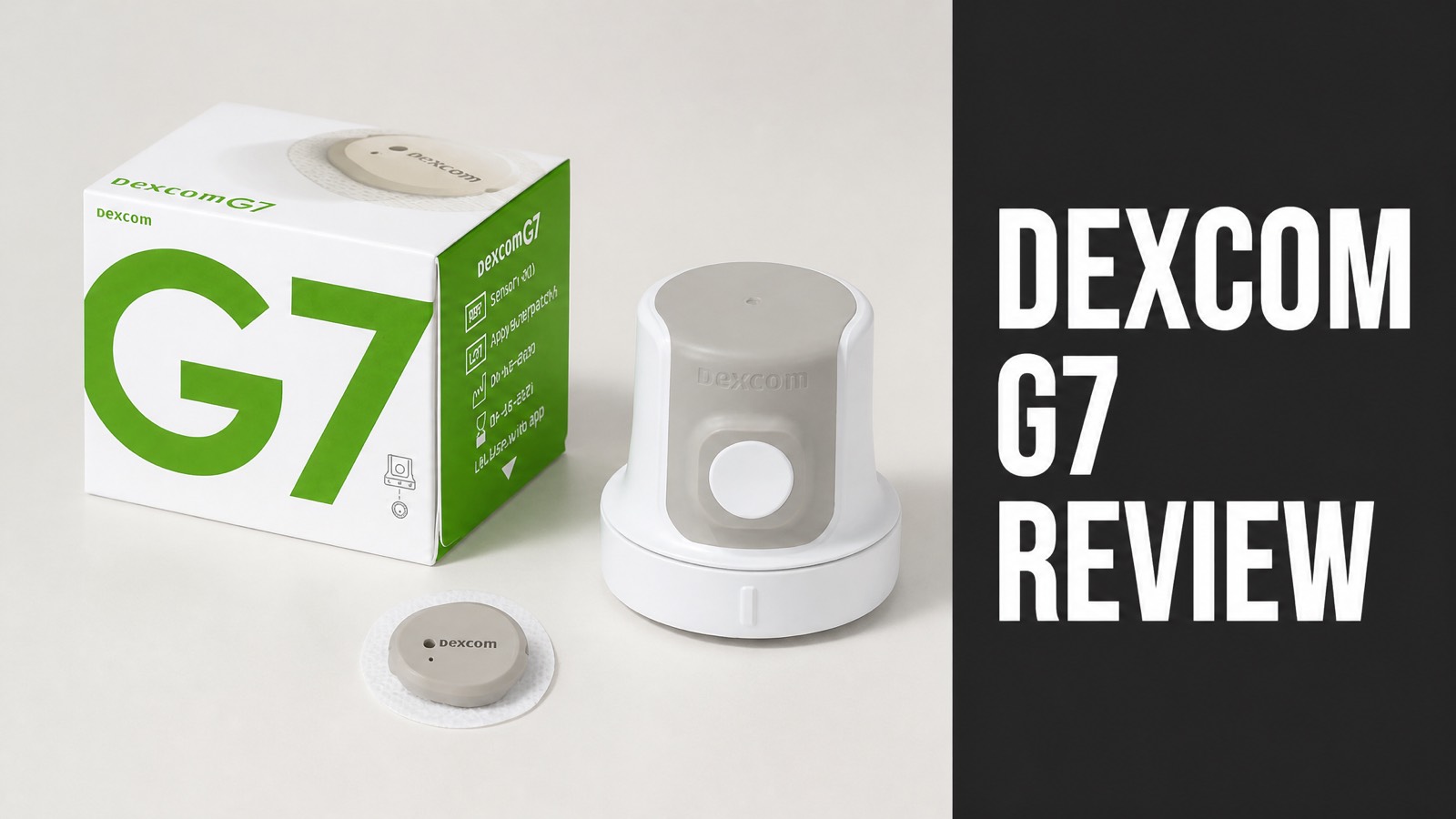
The Dexcom G7 is a continuous glucose monitor that reads glucose every 5 minutes from a small arm sensor. It pairs with a phone app or a receiver. People with type 1 or type 2 diabetes use it to track glucose day and night. Routine finger sticks become rare for most of its users.
The G7 combines its sensor and transmitter in one disposable piece. It is 60% smaller than the G6 and warms up in 30 minutes. Its MARD of 8.2% ranks among the best CGMs. Users praise the easy applicator and the clean, simple app. Common complaints include sensor failures, signal loss, and peeling adhesive. A newer 15-day version suits adults only.
The bigger picture is simple. The G7 trades a few hardware quirks for strong accuracy and less daily hassle. The sections below cover how it works, accuracy, real reviews, rivals, side effects, and cost. Read on to decide if the G7 fits your diabetes routine and your monthly budget.
What Is the Dexcom G7?
The Dexcom G7 is a continuous glucose monitor (CGM) that checks glucose every 5 minutes. It sends each reading to a phone or receiver. A tiny filament sits under the skin on the back of the arm. And unlike older models, the sensor and transmitter come as one disposable unit. You wear it for 10 days, then throw the whole thing away and apply a fresh one.
Size is the first thing users notice. The G7 is 60% smaller than the Dexcom G6. In fact, it’s about the size of three stacked quarters. A flat shape with no sharp edges means fewer snags on doorframes and seatbelts.
Key Specs:
- Glucose reading every 5 minutes
- 10-day wear plus a 12-hour grace period
- 30-minute warm-up
- 8.2% MARD for arm placement
- Approved for ages 2 and up
Two versions exist today. The original G7 lasts 10 days and suits ages 2 and up. The G7 15 Day lasts 15 days and is cleared for adults 18 and older. Both versions use the same hardware. Only the software and wear time differ.
Who Is the Dexcom G7 For?
The Dexcom G7 is built for people with type 1 or type 2 diabetes who want live glucose data. It replaces most routine finger sticks. Insulin users gain the most. Why? Alerts warn about highs and lows before they turn dangerous. The 10-day sensor is also cleared for children as young as 2. So whole families with a diabetic child rely on it every day.
Pump users are another key group. The G7 links with the Omnipod 5, Tandem pumps, and the Beta Bionics iLet. These systems adjust insulin automatically. That closed loop keeps glucose steadier overnight.
People without diabetes have a separate option. Dexcom Stelo is an over-the-counter biosensor with a 15-day wear. Here’s the kicker: Stelo uses the same sensor as the G7. Only the color and software differ.
How Does the Dexcom G7 Work?
The Dexcom G7 works by measuring glucose in the interstitial fluid just under the skin. It doesn’t sample blood directly. A thin filament reads that fluid every 5 minutes. The built-in transmitter then sends each value over Bluetooth to a phone, watch, or receiver. So you see a live number plus a trend arrow on the screen, all day and all night long.
Interstitial fluid trails blood by a few minutes. The lag usually runs 5 to 10 minutes. Does that matter much? Only when glucose moves fast, like after a meal or during exercise. Then a finger stick and the G7 won’t match exactly.
Predictive alerts are the real upgrade here. The G7 doesn’t just flag a low. It warns that a low is coming within the next 20 minutes. That warning gives users time to eat or adjust insulin before trouble starts.
How Do You Apply the Dexcom G7?
The Dexcom G7 applies in seconds with a one-button applicator on the back of the upper arm. Unscrew the lid, place the open end on fatty tissue, and press the button. Then hold the sensor down for about 10 seconds. The app pairs it with a 4-digit code or a QR scan. Most first-time users say the whole setup feels simple and takes only a few minutes.
Steps:
- Clean the site with an alcohol wipe and let it dry for 10 seconds.
- Unscrew the lid and place the applicator on the back of the arm.
- Press the button and lift the applicator away.
- Press the sensor for 10 seconds to set the adhesive.
- Enter the 4-digit code or scan the QR code in the app.
Placement affects accuracy. Pick a spot halfway between the shoulder and elbow with plenty of fat. Here’s the thing: the back of the arm is the only FDA-cleared site for adults. Some users report good results on the abdomen, which is CE marked in Europe.
Hydration helps too. The sensor reads fluid, so a well-hydrated body gives steadier numbers. Most users say insertion barely hurts. The needle is thin and the circular rim distracts the nerves.
What Are the Dexcom G7’s Key Features?
The Dexcom G7’s key features include an all-in-one sensor, a 30-minute warm-up, a grace period, and a new app. The 12-hour grace period gives you extra time to swap sensors when it suits you. The app now holds Clarity reports too. So trend data no longer needs a second download. Here’s why that matters: fewer steps and fewer apps mean fewer missed readings.
The 30-minute warm-up stands out. The G6 needed 2 hours. So what does that mean for you? By the time you finish a meal, readings are already flowing again. Fewer gaps mean steadier time-in-range data.
The app supports customizable alerts and quiet modes. You can silence alerts during a meeting or a movie. Different sounds work for day and night. Apple Watch support lets you glance at glucose without your phone.
What Changed in the Dexcom G7 15 Day?
The Dexcom G7 15 Day extends wear to 15 days plus a 12-hour grace period. That makes it the longest-lasting disposable CGM on the market. It runs on the same hardware as the 10-day model with a new algorithm. Its published MARD improves to 8.0%. But the 15-day sensor is cleared only for adults 18 and older. So kids and teens stay on the 10-day model.
Version Comparison:
| Feature | G7 10 Day | G7 15 Day |
|---|---|---|
| Wear time | 10 days + 12 hours | 15 days + 12 hours |
| Warm-up | 30 minutes | 60 minutes |
| MARD | 8.2% (arm) | 8.0% |
| Age | 2 and up | 18 and up |
| Sensors per month | 3 | 2 |
The warm-up doubled to 60 minutes. The Diabetes Strong reviewer calls that a step back. The good news? The sensor starts warming once inserted. So you can insert it an hour early and start it in the app later.
Dexcom also discloses that 73.9% of 15-day sensors finish the full wear. That means about 26% may stop early. Dexcom generally replaces failed sensors. Diabetech founder Justin Eastzer tested four sensors over two months.
Is the Dexcom G7 Accurate?
Yes. The Dexcom G7 is accurate, with a MARD of 8.2% on the arm and 8.0% for the 15-day version. MARD measures the average gap between CGM values and lab blood values. A lower number means better accuracy. And anything under 10% is considered strong enough for treatment decisions without a finger stick. The G7 clears that bar easily on paper and in practice.
Real-world tests back up the numbers. A Diabetes Strong reviewer compared six 15-day sensors against finger sticks. Very few readings were off by more than 20 mg/dL (1.1 mmol/L). Most larger gaps showed up in the first 24 hours.
Placement and sleep position affect accuracy. Lying on the sensor squeezes the tissue. This pressure causes false ‘compression lows’ at night. One teen reviewer at The Diabetes Link saw several of these on the arm.
Does the Dexcom G7 Need Calibration?
No. The Dexcom G7 is factory calibrated and does not need finger-stick calibration for normal use. Users can still calibrate with a meter reading if the sensor seems to drift. Most long-term reviewers skip that step entirely. To be clear, a finger stick is still smart when symptoms don’t match the number on the screen. Trust your body first, always.
Early readings deserve extra caution. The first day of any sensor tends to be the least stable. So compare against a meter if a first-day number looks odd. After that, readings usually settle down and track closely.
What Do Dexcom G7 Reviews Say?
Dexcom G7 reviews are split between strong praise and sharp complaints about sensor failures and support. Diabetes educators and bloggers rate it highly for size, warm-up, and accuracy. But Dexcom holds a 1.5 out of 5 TrustScore on Trustpilot from 1,567 reviews. Those reviews cover every Dexcom product, not just the G7, and skew toward support issues.
Context matters with online ratings. Trustpilot notes Dexcom hasn’t invited reviews recently. So unhappy customers likely dominate the sample. Long-term reviewers who wear the G7 daily tell a more balanced story.
What Do Users Like?
Users like the Dexcom G7’s small size, painless insertion, fast warm-up, and simple all-in-one app. Jamie Pauls of AccessWorld found setup accessible as a blind user. A teen reviewer at The Diabetes Link called the circular applicator genius. And Diabetes Strong reports fewer sensor issues than with the G6 after two full years of daily wear and testing.
Pros:
- 60% smaller than the G6
- 30-minute warm-up on the 10-day sensor
- 12-hour grace period
- Clarity reports built into the app
- Apple Watch and pump integration
Alerts get good marks too. Jamie Pauls finds them less intrusive than FreeStyle Libre alarms. Others love the quiet modes. And the grace period removes the stress of a sensor dying at a bad moment.
What Are Common Complaints?
Common complaints about the Dexcom G7 center on sensor failures, signal loss, and adhesive that peels early. One Trustpilot reviewer had two failures in the first 3-month supply. Another struggled to pair the sensor at all. Customer service also draws criticism for long hold times and unhelpful bots. Those support problems frustrate long-term users the most.
Cons:
- Sensors sometimes fail early
- Signal loss when the phone is out of range
- Adhesive peels around day 7 or 8 for some
- Compression lows during sleep
- Sensors can’t be extended past their wear time
Bluetooth range is limited. Leave your phone in the kitchen and walk to the backyard? The signal drops. It reconnects quickly once you’re back in range. Thick walls and other electronics make the problem worse.
How Does the Dexcom G7 Compare to Competitors?
The Dexcom G7 matches or beats most competitors on accuracy and warm-up but trails some on wear time. The FreeStyle Libre 3 lasts up to 15 days and reads glucose every minute. The Dexcom G6 needs a separate transmitter and a 2-hour warm-up. So the G7 sits between the two on wear time. It clearly leads the older G6 on convenience, comfort, and size.
CGM Comparison:
| Feature | Dexcom G7 | Libre 3 | Dexcom G6 |
|---|---|---|---|
| Wear time | 10 or 15 days | Up to 15 days | 10 days |
| Reading interval | 5 minutes | 1 minute | 5 minutes |
| Warm-up | 30 or 60 minutes | 60 minutes | 2 hours |
| Separate transmitter | No | No | Yes |
The G6 is being phased out. Many users were forced to switch to the G7. Is that a downgrade? For most people, no. The smaller all-in-one design and faster warm-up are clear wins.
Is the Dexcom G7 Better Than FreeStyle Libre 3?
No. The Dexcom G7 is not clearly better than the FreeStyle Libre 3, but it wins for pump users. Both are accurate and both pair with a phone. The Libre 3 is slightly smaller and reads glucose every minute. The G7 also links with more insulin pumps. Those pumps include the Omnipod 5, Tandem, and iLet. The G7 also offers flexible alerts and quiet modes.
Cost often decides the match. Jamie Pauls switched from Libre to the G7 when Libre prices rose and insurance covered Dexcom. Bottom line: check your plan first. The covered brand is often the cheaper one.
What Are the Dexcom G7 Side Effects?
The Dexcom G7’s side effects are mostly mild skin reactions at the sensor site. Redness, itching, and adhesive irritation are the usual culprits. A small share of users react to the medical-grade glue after 10 days of wear. And removal can sting a little bit. One Trustpilot reviewer described the sensor as painful to remove at the end of a wear session.
Possible Side Effects:
- Redness around the adhesive
- Itching or a rash
- Minor bleeding at insertion
- Soreness during removal
Can you prevent irritation? Often, yes. A barrier film under the patch protects sensitive skin. Rotating sites gives skin time to heal. Softer overlay patches, like Skin Grip, cut irritation for many users.
Who Should Avoid the Dexcom G7?
People with severe adhesive allergies should avoid the Dexcom G7 or test it first under a doctor’s guidance. Kids under 18 can’t use the 15-day version at all. Users of older insulin pumps need to confirm compatibility first. Some pumps still only work with the G6. Switching too early breaks the automated closed loop that keeps nights steady and safe.
Phone compatibility matters too. Is your phone supported? Not every smartphone model is. Check Dexcom’s compatibility list before filling a prescription. Otherwise, a receiver is the backup option.
How Much Does the Dexcom G7 Cost?
The Dexcom G7 costs about $180 a month without insurance when bought with a GoodRx coupon. That price covers three 10-day sensors or two 15-day sensors. Insurance changes the math entirely. Most plans cover the G7 with a monthly copay, though some prefer a rival brand. So call your insurer before you order. A quick call often saves hundreds of dollars.
Cost Breakdown:
| Option | Sensors | Monthly Cost |
|---|---|---|
| G7 10 Day with GoodRx | 3 | About $180 |
| G7 15 Day with GoodRx | 2 | About $180 |
| With insurance | 2 or 3 | Plan copay |
Where should you buy it? The G7 needs a prescription. Retail pharmacies are usually faster than medical equipment suppliers. But the price can differ a lot by plan, so compare both routes.
Is the Dexcom G7 Worth the Price?
Yes. The Dexcom G7 is worth the price for insulin users who need accurate alerts and pump integration. Fewer finger sticks and early low warnings bring real peace of mind. But the 15-day sensor doesn’t save money. Dexcom prices sensors by wear time. So two 15-day sensors cost the same as three 10-day ones. Expect to pay about $180 a month either way.
Value depends on coverage. With good insurance, the G7 is an easy choice. Paying cash? Compare it with the Libre 3 and Stelo first. The cheapest accurate CGM is the one you’ll keep wearing.
Should You Try Eat Proteins?
Yes. Eat Proteins gives you honest reviews and nutrition advice that make glucose data easier to use. A CGM shows how food moves your numbers. Our team at Eat Proteins explains which meals keep those numbers steady. Want fewer glucose spikes after lunch? Protein-rich meals often help. Our guides show you exactly how to build them at home, step by step.
Don’t let all that data go to waste. Pair your G7 readings with smarter meals. Then watch your time-in-range climb. Start reading Eat Proteins today.
How Does Eat Proteins Support Blood Sugar Goals?
Eat Proteins supports blood sugar goals with clear guides on protein, balanced meals, and health tracking. Our experts connect what you eat with what your sensor shows. Here’s the part most people miss: protein and fiber slow glucose spikes. Log a few meals next to your CGM graph. The pattern becomes clear fast, often within a single week of tracking.
Small changes add up. Add protein to breakfast and move after meals. Check back with Eat Proteins for new reviews and recipes. Your next steady reading starts with your next meal.